A guided tour of the Detection Observatory
Diátaxis quadrant: How-to (annotated tour). Audience: Red/Blue developers who want to see what the Observatory looks like before running it.
This is a screenshot walkthrough of the live Detection Observatory. Every image below is the real page rendering a real session — a Chrome DevTools Protocol-driven bot that scored 89.7 and was denied. To run it yourself, see Watch detection happen live.
Note: The screenshots show a development, loopback-only build. The page is disabled by default and refuses to bind a non-loopback address.
The whole page at a glance
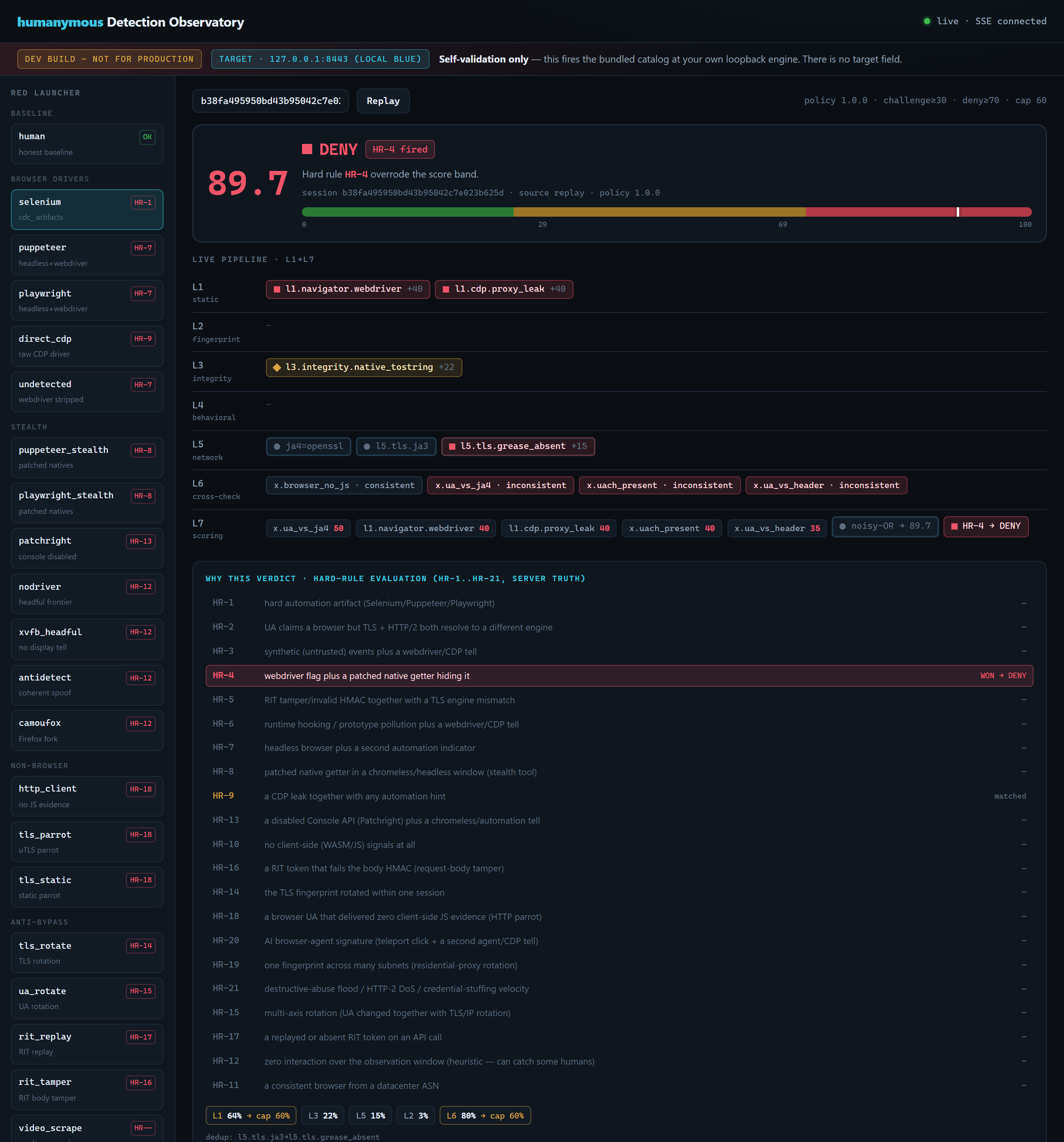
Three zones under a fixed guardrail banner:
- Left — the Red launcher. The bundled catalog, grouped by kind, each card showing its documented tell and the enforcement rule you expect it to trip.
- Centre — the live pipeline. The verdict and risk gauge on top, then the seven-stage waterfall as signals arrive.
- Below — “why this verdict”. The server’s own enforcement-rule evaluation and score decomposition.
The banner never leaves the top: DEV BUILD — not for production, the fixed target 127.0.0.1:8443, and self-validation only — there is no target field.
Reading the verdict

The score is 89.7, and the marker sits deep in the red DENY band (the bands break at 29 and 69). The badge shows an enforcement rule matched — WebDriver concealment rule — and the line beneath states plainly that the enforcement rule overrode the score band. An enforcement rule wins regardless of the number: even a low score would deny here.
The seven-stage waterfall
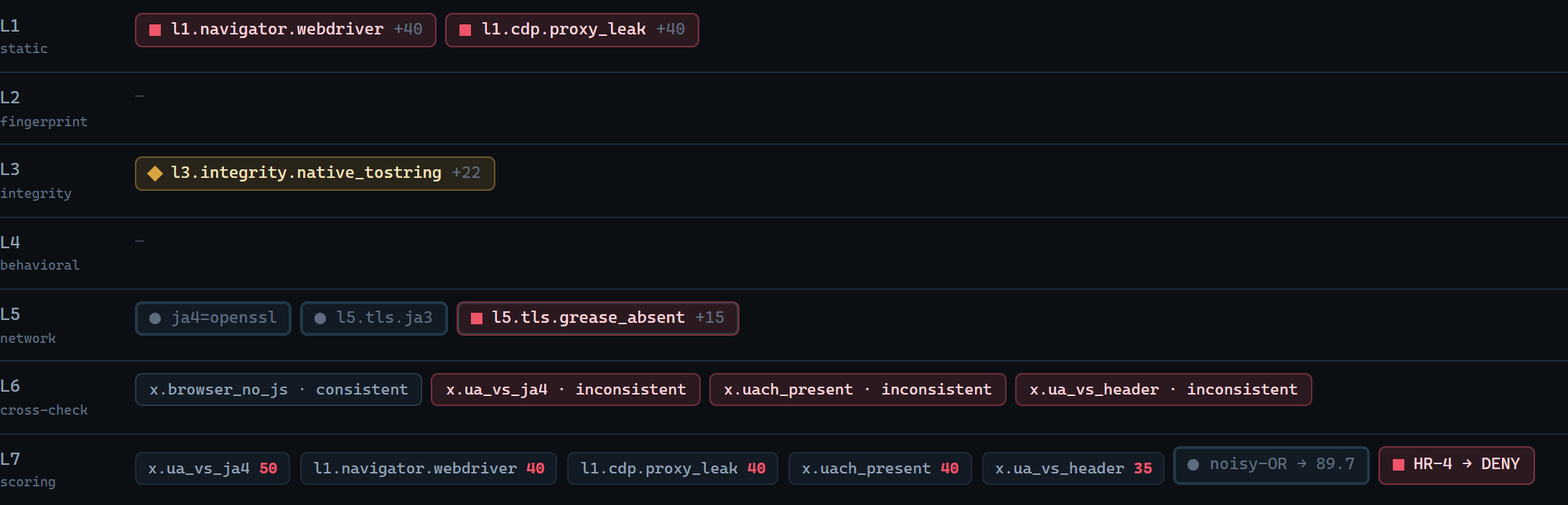
Each firing signal is a chip in its layer lane, shape- and colour-coded so the verdict reads without relying on colour alone:
- ■ BOT (red square) —
l1.navigator.webdriver,l1.cdp.proxy_leak - ◆ SUSPICIOUS (amber diamond) —
l3.integrity.native_tostring - ● OK (green circle) — honest signals
- An inset tint marks server-observed network and consistency-check signals (the network fingerprint and the cross-checks the server derived, which arrive after the client batch).
At consistency-check stage the cross-checks show which identity-consistency claims held and which broke; at scoring and policy stage the top contributors, the combined noisy-OR → 89.7, and the HR → DENY override are laid out as the final step.
Why this verdict — the honest explainer
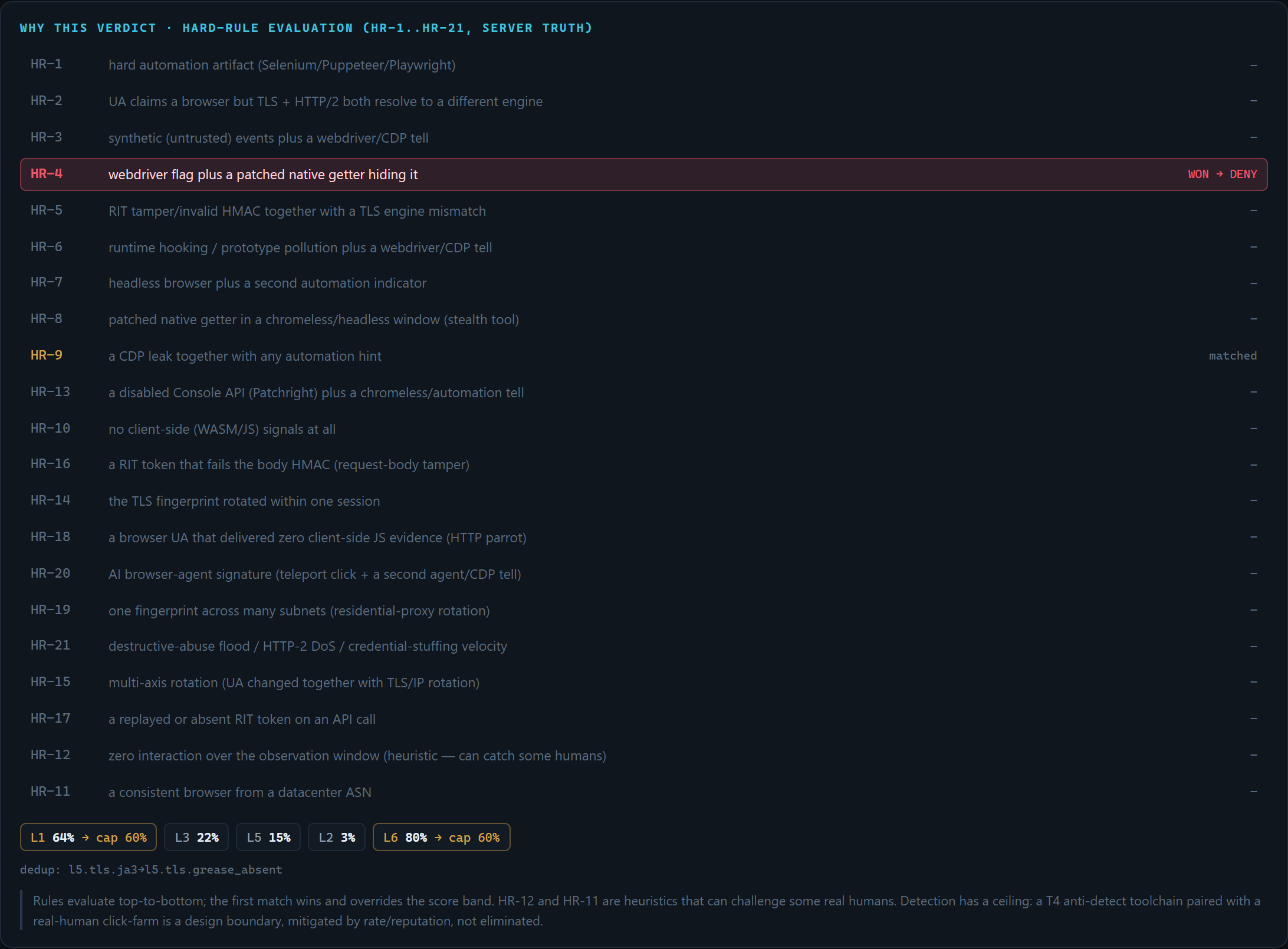
This panel is the point of the Observatory. It comes straight from the engine’s own scoring — not a re-implementation — so what you read is what the engine did.
- The enforcement-rule ladder evaluates the Core enforcement-rule set in order. Here WebDriver concealment rule (“webdriver flag plus a patched native getter hiding it”) is the first match, so it WON. Notice browser-control leak plus automation evidence rule further down is also matched but did not win — the first match takes the verdict. This is exactly how the engine decides, made visible.
- The per-stage decomposition shows each stage’s combined probability and where the per-stage cap clamped it. For example, static client inspection at 64% and consistency checks at 80% are each capped at 60%. No single stage is allowed to dominate.
- Dedup shows where two tells from the same root cause were collapsed so they weren’t double-counted.
The Red launcher

Pick a profile, set runs (1–5), and press Launch (local). The launcher requests a single-use nonce and fires that one profile at your own engine — the target is fixed in the server; there is no host field, so the Red side structurally cannot be aimed off-box. Before each run the stateful detectors are reset and runs are serialized, so a flood can’t poison your next baseline. Abort cancels an in-flight run.
The human card is the honest baseline you expect to pass; everything else is automation you expect the engine to catch. Browser-driver profiles need a local browser installed — if one is absent the run reports a skip reason rather than failing silently.
Run it yourself
- Watch detection happen live: the Detection Observatory — the step-by-step how-to (enable, open, launch, read).
- Self-validation: red-team your own deployment — the terminal version that runs the whole catalog and reports your block-rate / false-positive rate.
- enforcement rules and verdicts — what each enforcement rule and verdict in these screenshots means.